Date/Time
- Java
- 2021년 12월 8일
1. 등장 배경
1) 명확하지 않은 클래스 이름
- 날짜 클래스중 Date 는 시간과 TimeStamp 모두 표현할 수 있다. (사실상 TimeStamp)
- 시간 값이 에폭타임 이라 하여 세계 표준시(UTC)로 1970년 1월 1일 00시 00분 00초를 기준으로 현재까지 흐른 모든 시간을 초(sec)단위로 표현 하여 사람이 알아보기 어렵다.
2) Thread safe하지 않은 mutable한 속성
public static void main(String[] args) throws InterruptedException {
    Date date = new Date();
    long time = date.getTime();
    System.out.println("date = " + date);
    Thread.sleep(1000 * 3);
    Date after3Seconds = new Date();
    System.out.println("after3Seconds = " + after3Seconds);

    after3Seconds.setTime(time);
    System.out.println("after3Seconds = " + after3Seconds);
}

/*
   [실행 결과]
   date = Thu Oct 28 20:22:24 KST 2021
   after3Seconds = Thu Oct 28 20:22:27 KST 2021
   after3Seconds = Thu Oct 28 20:22:24 KST 2021
*/
새로 생성한 after3Sceconds 라는 객체가 setter를 통해 다른 시간으로 변경이 된 것을 볼 수 있는데, 이는 Date 클래스가 mutable 하다는 것을 의미한다. mutable하기 때문에 thread unsafe 하다.
thread unsafe? Date 인스턴스의 값을 각각 다른 Thread에서 접근해서 변경이 가능하면 기존에 사용하던 Thread에서 변경 되어 잘못된 Date 정보를 가져와서 버그가 발생할 위험이 있다는 뜻.
3) 버그 발생할 여지가 많다.
사용법 자체에서도 사용법에 대해 오해할 수 있어 버그가 발생할 여지가 있다.
Calendar birthDay = new GregorianCalendar(1988, 6, 10);
위 코드를 보면 생일이 1988년 6월 10일임을 표현하고 싶지만, GregorianCalendar에서 month는 0부터시작하기 때문에 6을 넣으면 7월이라는 의미가 된다. 그래서 혼동하지 않기 위해서 상수 값을 쓰곤 했다. (ex: Calendar.JUNE)
하지만 이도 임시 방편이었고 암묵적으로 Java 8 이전에는 Joda-Time 을 사용했었다.
2. 디자인 철학
1) Clear
- API 메소드는 명확해야한다.
- 예를들어 클래스명이 Date지만 날짜 뿐 아니라 시간(Time)까지 다루게되면 명확하지 않다.
- 시간(Time)역시 사람에게 익숙한 일반 시간이 아닌 에폭타임인 것은 Clear하지 않다.
2) Fluent
메소드가 null을 반환하는 경우가 없기 때문에 메소드 체이닝이 가능하기에 코드가 유려해진다.
3) Immutable
기존 날짜 인스턴스의 내용이 변하지 않으며 변경메소드 호출시 값이 변경되는게 아니라 새로운 날짜 인스턴스를 생성해 반환해야한다.
LocalDate today = LocalDate.of(2021, Month.OCTOBER, 28);
LocalDate nextMonth = today.plusMonths(1);

//LocalDateTime의 plusDays() 메서드
public LocalDateTime plusDays(long days) {
    LocalDate newDate = date.plusDays(days);
    return with(newDate, time);
}

private LocalDateTime with(LocalDate newDate, LocalTime newTime) {
    if (date == newDate && time == newTime) {
            return this;
    }
    return new LocalDateTime(newDate, newTime);
}
Date/Time의 모든 객체는 mutable한 속성의 단점을 해결하고자 Immutable한 속성을 갖고 설계가 되었는데 이 때문에 메서드를 이용해 날짜,시간을 변경하면 위에 정의된 with()함수를 사용하게 되고 with()함수는 새로운 객체를 만들어 반환하고 있는 것을 볼 수 있다.
4) Extensible
- 확장 가능해야 한다.
- 달력에는 윤달, 음력, 양력, 불교달력 등 다양한 종류의 달력의 확장이 가능해야 한다.
3. 기존 API와 추가된 API
1) 기존 API
- java.util.Date
- java.util.Calendar
- java.text.SimpleDateFormat
2) 추가된 API
- java.time.Instant : 기계시간
- java.time.LocalDate : 날짜(시간x), 타임존x
- java.time.LocalTime : 시간(날짜x), 타임존x
- java.time.LocalDateTime : 날짜/시간, 타임존x
- java.time.ZonedDateTime : 날짜/시간, 타임존o
- java.time.DateTimeFormatter
- java.time.Duration
- java.time.Period
- java.time.TemporalAdjuster
4. API 사용 예
1) Instant
Instant instant = Instant.now();
System.out.println(instant); //2021-11-02T14:07:19.218304100Z  (기준시 UTC 기준)

ZonedDateTime zonedDateTime = instant.atZone(ZoneId.systemDefault());
System.out.println(instant); //2021-11-02T23:08:45.188601700+09:00[Asia/Seoul]  (현재 KTC 기준)
- Instant.now(): 현재 UTC(GMT)를 반환 (Universal Time Coordinated == Greenwich Mean Time)
- ZoneId.systemDefault() : 현재 시스템상의 zone 정보를 반환 (ex: Asia/Seoul)
- instant.atZone(zone) : UTC 기준이아닌 zone 의 위치 기반의 시간을 반환
2) LocalDate / LocalTime / LocalDateTime / ZonedDateTime
LocalDateTime now = LocalDateTime.now();    //서버의 시스템 zone 기준
System.out.println(now);

LocalDateTime of = LocalDateTime.of(1982, Month.JULU, 15,0,0,0);

ZonedDateTime nowInKorea = ZonedDateTime.now(ZoneId.of("Asia/Seoul"));
System.out.println(nowInKorea);
보통 사람이 읽고 쓰기 편한 시간 표현방식으로 표현해주는 API
- LocalDateTime.now() : 현재 시스템 Zone에 해당하는(로컬) 일시를 반환
- LocalDateTime.of(1988, Month.JUNE, 10, 0, 0, 0); : 로컬의 특정 일시를 반환
- ZonedDateTime.now(ZoneId.of(“UTC”)) : 특정 Zone의 현재 시간을 반환합니다.
- ZonedDateTime.of(1988, Month.JUNE.getValue(),10,0,0,0,0, ZoneId.of(“UTC”)) : 특정 Zone의 특정 일시를 반환합니다.
3) Duration / Period
//Period
LocalDate today = LocalDate.now();
LocalDate thisYearBirthDay = LocalDate.of(2022, Month.FEBRUARY,7);

Period period = Period.between(today, thisYearBirthDay);
System.out.println("생일까지 남은 기간 : " + period.getYears() + " 년 " + period.getMonths() + "월 " + period.getDays() + "일" );  //생일까지 남은 기간 : 0 년 3월 5일

Period p = today.until(thisYearBirthDay);
System.out.println("생일까지 남은 기간 : " + p.getYears() + " 년 " + p.getMonths() + "월 " + p.getDays() + "일" );  //생일까지 남은 기간 : 0 년 3월 5일

//Duration
Instant now = Instant.now();
Instant plus = now.plus(10,ChronoUnit.SECONDS);
Duration between = Duration.between(now,plus);
System.out.println(between.getSeconds());   //10
Period는 사람이 사용하는 날짜/시간의 기간을 측정, Duration은 초단위(나노,밀리)로 반환을 하기 때문에 주로 기계용 시간간의 기간을 측정하는데 사용할 수 있다.
시간 비교시 유용한 방식
위의 방식은 대부분 시간 메소드를 어떤식으로 사용해야하는 지에 대해서 이야기하는게 대부분인데, 실제로 제일 필요한 건 시간 비교가 제일 유용할 것 같아서 좀 더 정리해본다.
LocalDateTime time1 = LocalDateTime.of(2021, 11, 3, 10, 18, 0);
LocalDateTime time2 = LocalDateTime.of(2021, 11, 3, 10, 19, 0);

public boolean isAfter(ChronoLocalDate other)  //주어진날짜가 other보다 크면.. True

System.out.println(time1.isAfter(time2)); //false
System.out.println(time2.isAfter(time1)); //true

public boolean isBefore(ChronoLocalDate other) //주어진날짜가 other보다 작으면.. True

System.out.println(time1.isBefore(time2)); //true
System.out.println(time2.isBefore(time1)); //false

public boolean isEqual(ChronoLocalDate other) //주어진날짜가 other보다 같으면.. True

public int compareTo(ChronoLocalDate other)  //주어진날짜가 other보다 같으면 0, 크면 + 작으면 -
System.out.println(time1.compareTo(time2)); //-1
System.out.println(time2.compareTo(time1)); // 1
//날짜를 하루정도로 바꿔서 변환해보자 11/3 11/4 시간은 동일하게
System.out.println(time1.compareTo(time2)); //-1
System.out.println(time2.compareTo(time1)); // 1

public LocalDateTime truncatedTo(TemporalUnit unit)
isAfter,isBefore과 같은 메서드를 통해 비교를 수행할수 있다.
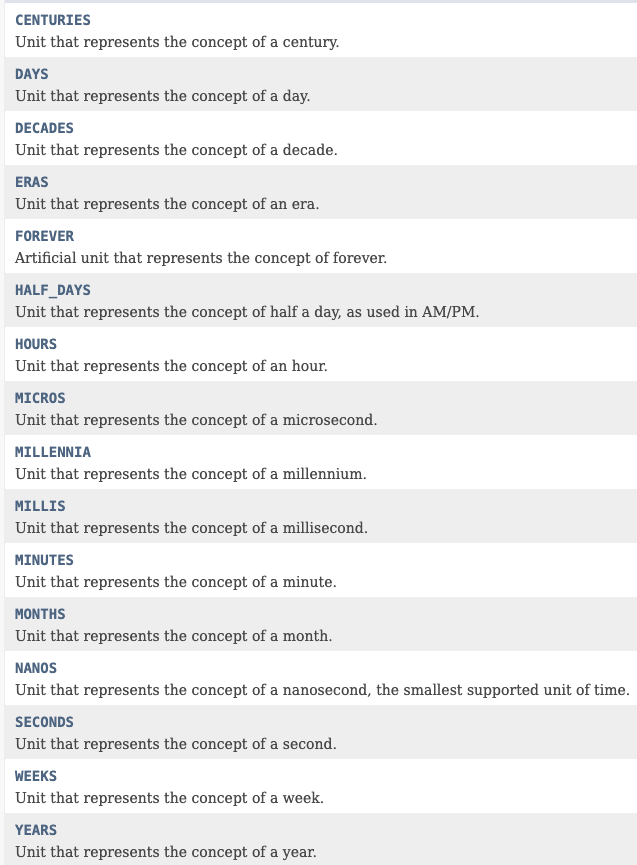
이때 truncatedTo() 메서드를 이용해서 시간을 잘라 내고 날짜만으로 비교가 가능한데 trucatedTo()메서드는 파라미터로 지정된 단위 이후의 값들을 버린 후, 복사한 LocalDateTime 객체를 리턴하는 메서드이다. 파라미터로 전달되는 단위는 ChronoUnit 클래스에 지정된 상수를 사용하며, DAYS보다 큰 단위인 YEARS, MONTHS 등의 값은 허용되지 않는다.
LocalDateTime time1 = LocalDateTime.of(2021, 11, 3, 10, 18, 3);
System.out.println(time1.truncatedTo(ChronoUnit.SECONDS)); //2021-11-03T10:18:03
System.out.println(time1.truncatedTo(ChronoUnit.MINUTES)); //2021-11-03T10:18
System.out.println(time1.truncatedTo(ChronoUnit.HOURS)); //2021-11-03T10:00
System.out.println(time1.truncatedTo(ChronoUnit.DAYS)); //2021-11-03T00:00
현 기준 날짜로 절삭 해서 사용가능히고 현 시간을 시점으로 + -도 ChronoUnit으로 더 효율적으로 할 수 있다.
LocalDateTime time1 = LocalDateTime.of(2021, 11, 3, 10, 18, 3);
LocalDateTime time2 = LocalDateTime.of(2021, 11, 4, 10, 18, 0);

//3일이 더해짐.
System.out.println(time1.plus(3, ChronoUnit.DAYS)); //2021-11-06T10:18:03
//3일이 빠짐.
System.out.println(time1.minus(3, ChronoUnit.DAYS)); //2021-11-06T10:18:03
//구체적으로 3년이 이런식으로 추가도 가능하다.
System.out.println(time1.plusYears(3));//2024-11-03T10:18:03
//빼는것도 ㅆㄱㄴ
System.out.println(time1.minusYears(3)); //2018-11-03T10:18:03

//아니면 이런식으로 사용할수도 있다.
ChronoUnit.HOURS.between(time1, time2); //23 (23.x 분 차이이기 때문에)
truncatedTo가 날짜부터는 자를 수 없는 이유
일수부터는 생략한다는 개념이 모호하다.예를 들어, day에 0이 오는것도 말이 안되며 1이 온다고 해도 일수를 잘라내 정확히 년,월을 뜻하는게 아니라 년,월,1일을 뜻하는 것이기 때문에 매개변수로 올 수 가 없는 것이다.
하지만 해당해의 1일을 만약에 표시하고 싶을경우에는 TemporalAdjusters(시간 조정기) 를 이용할 수 있다.
date.with(TemporalAdjusters.firstDayOfMonth()).truncatedTo(ChronoUnit.DAYS); //2021-11-01T00:00
date.with(TemporalAdjusters.firstDayOfYear()) : 해당 년도의 1월 1일 //2021-01-01T17:02:22.973160900
date.with(TemporalAdjusters.firstDayOfMonth()) : 해당 월의 1일 //2021-11-01T17:03:05.777745100
date.with(TemporalAdjusters.lastDayOfYear()) : 해당 년도의 마지막 날짜 //2021-12-31T17:03:34.531656400
date.with(TemporalAdjusters.lastDayOfMonth()) : 해당 월의 마지막 날짜 //2021-11-30T17:04:03.837483400
ChronoUnit
4) DateTimeFormatter
//formatting
LocalDateTime now = LocalDateTime.now();

DateTimeFormatter formatter = DateTimeFormatter.ISO_DATE_TIME;
System.out.println(now.format(formatter));      //2021-11-02T23:28:51.388655

formatter = DateTimeFormatter.ofPattern("MM.dd.yyyy");
System.out.println(now.format(formatter));      //11.02.2021
DateTimeFormatter은 ofPattern()을 이용해 특정 패턴을 지정할 수 있고 미리 정의된 포맷터들이 존재하는데 이 형식을 이용하고자하면 굳이 새로 정의해줄 필요가 없다. 정의된 포맷터들은 여기 를 참고하자.
이때, Formatter에 사용되는 형식은 다음처럼 사용 가능하다.
  Symbol  Meaning                     Presentation      Examples
  ------  -------                     ------------      -------
   G       era                         text              AD; Anno Domini; A
   u       year                        year              2004; 04
   y       year-of-era                 year              2004; 04
   D       day-of-year                 number            189
   M/L     month-of-year               number/text       7; 07; Jul; July; J
   d       day-of-month                number            10

   Q/q     quarter-of-year             number/text       3; 03; Q3; 3rd quarter
   Y       week-based-year             year              1996; 96
   w       week-of-week-based-year     number            27
   W       week-of-month               number            4
   E       day-of-week                 text              Tue; Tuesday; T
   e/c     localized day-of-week       number/text       2; 02; Tue; Tuesday; T
   F       week-of-month               number            3

   a       am-pm-of-day                text              PM
   h       clock-hour-of-am-pm (1-12)  number            12
   K       hour-of-am-pm (0-11)        number            0
   k       clock-hour-of-am-pm (1-24)  number            0

   H       hour-of-day (0-23)          number            0
   m       minute-of-hour              number            30
   s       second-of-minute            number            55
   S       fraction-of-second          fraction          978
   A       milli-of-day                number            1234
   n       nano-of-second              number            987654321
   N       nano-of-day                 number            1234000000

   V       time-zone ID                zone-id           America/Los_Angeles; Z; -08:30
   z       time-zone name              zone-name         Pacific Standard Time; PST
   O       localized zone-offset       offset-O          GMT+8; GMT+08:00; UTC-08:00;
   X       zone-offset 'Z' for zero    offset-X          Z; -08; -0830; -08:30; -083015; -08:30:15;
   x       zone-offset                 offset-x          +0000; -08; -0830; -08:30; -083015; -08:30:15;
   Z       zone-offset                 offset-Z          +0000; -0800; -08:00;

   p       pad next                    pad modifier      1

   '       escape for text             delimiter
   ''      single quote                literal           '
   [       optional section start
   ]       optional section end
   #       reserved for future use
   {       reserved for future use
   }       reserved for future use
LocalDateTime now = LocalDateTime.now();
formatter = DateTimeFormatter.ofPattern("MM.dd.yyyy");
System.out.println(now.format(formatter));      //11.02.2021

//parsing
LocalDate parse = LocalDate.parse("08.12.2021",formatter);
System.out.println(parse);
또한, Date/Time타입의 parse()메서드를 통해서 특정 문자열을 ofPattern에서 선언한 패턴 방식으로 파싱하여 LocalDate 타입의 인스턴스를 생성해 반환할 수도 있다.
5) 레거시 API 지원
예전에 구현 및 사용하던 날짜와 시간(Date) API와 현재 추가된 LocalDate, LocalDateTime, Instant는 서로 호환 된다!
public static void main(String[] args) {
    Date date = new Date();
    Instant instant = date.toInstant();
    Date newDate = Date.from(instant);

    GregorianCalendar gregorianCalendar = new GregorianCalendar();
    LocalDateTime dateTime = gregorianCalendar.toInstant()
            .atZone(ZoneId.systemDefault())
            .toLocalDateTime();
    ZonedDateTime zonedDateTime = ZonedDateTime.from(dateTime);

    GregorianCalendar from = GregorianCalendar.from(zonedDateTime);

    ZoneId zoneId = TimeZone.getTimeZone("PST").toZoneId();
    TimeZone timeZone = TimeZone.getTimeZone(zoneId);
}
- GregorianCalendar와 Date 타입의 인스턴스를 Instant나 ZonedDateTime으로 변환
- java.util.TimeZone에서 java.time.ZoneId로 상호 변환 가능
Reference
(Java) 날짜 비교하기 ( LocalDate, LocalDateTime, Date, Calendar)
(Java8 Time API) Duration과 Period 사용법 (+ChronoUnit)
https://codeblog.jonskeet.uk/2017/04/23/all-about-java-util-date/